
I have gradually expanded my personal website into three real reading products: a desktop and mobile website for public access and search, a WeChat Mini Program for quick discovery inside WeChat, and a native macOS application for focused reading, bookmarks, and offline access.
They are not three separately maintained content libraries, and the clients are not differently sized web wrappers. Each article is maintained once in the website repository. Purpose-specific read-only APIs then deliver the appropriate representation to each client. The facts are shared; interaction, information density, caching, and product responsibilities remain platform-specific.
Try the products
Visit houhuiyang.com · Download Code & Product Notes for macOS 1.0.0 (macOS 14+)
SHA-256:7a45940a1278f366f452467b766372e5a693f1d144b0be525c902461d38511e9
Why build three versions?
The same reader has different needs in different contexts. In a desktop browser, someone may arrive through search and expect complete articles, project context, and shareable URLs. Inside WeChat, the priority is opening quickly, understanding the essentials, and forwarding a useful page. At a Mac, a reader may want search, bookmarks, reading progress, and access to recently opened articles when the network is unreliable.
| Client | Primary job | Content form | Key experience |
|---|---|---|---|
| Website | Public publishing and durable discovery | Complete Chinese and English content | SEO, sharing, responsive layout |
| WeChat Mini Program | Fast discovery inside WeChat | Chinese summaries and selected sections | Quick launch, article and project navigation |
| macOS | Focused desktop reading | Complete Markdown | Search, bookmarks, book spread, progress, offline cache |
Website: the source of truth and the public entrance
The website owns the content. Markdown files, titles, descriptions, dates, tags, covers, and bodies live in one versioned repository. Next.js produces the localized pages, metadata, sitemap, and stable article routes.
The desktop experience carries the complete information architecture: what I am doing now, the systems I use, how I think, the path I have taken, practical AI work, and technical notes. An article therefore sits inside a broader record of long-term work rather than becoming an isolated fragment.

Desktop homepage preview. Click the image to open the complete capture.
The mobile website uses the same content but reorganizes it for a narrow viewport. Navigation becomes a mobile menu, horizontal cards turn into a vertical flow, and headings, actions, and timelines gain a different rhythm. A reader opening a link from search or chat does not need to install anything.

Mobile homepage preview. Click the image to open the complete capture.
The website retains the highest information completeness and owns public URLs, canonical metadata, Open Graph previews, the sitemap, and indexing. Native clients improve specific reading situations without replacing the open web.
WeChat Mini Program: shortening the discovery path
The Mini Program is designed for quick entry from a conversation, QR code, or profile. Its home screen keeps only an introduction, current interests, selected projects, and article access. A fixed tab bar makes Home, Articles, and Projects the three primary destinations.
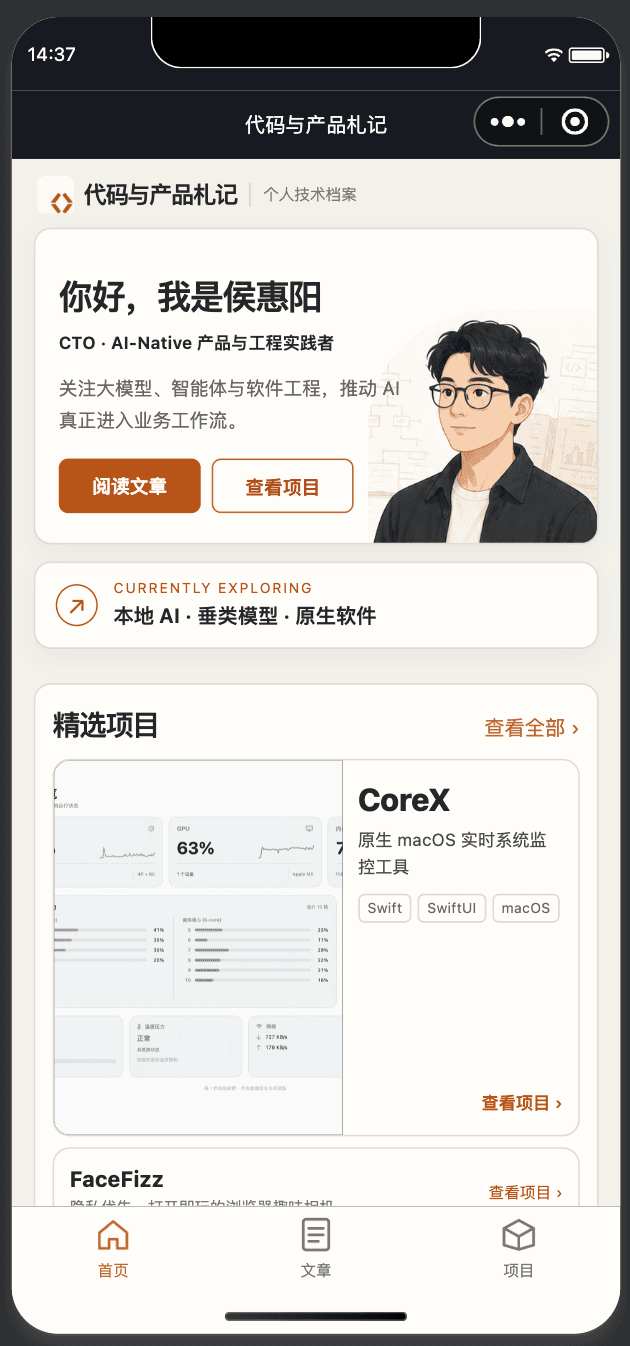
The Mini Program does not parse website HTML. It calls the independent /api/articles interface, which returns titles, descriptions, tags, reading time, and selected sections suitable for a lightweight client. The app renders content but cannot edit the source.
This boundary keeps website redesigns from breaking the Mini Program and lets the API deliberately control information density. The public site supports complete expression; the Mini Program supports low-friction discovery.
Scan with WeChat

macOS: turning articles into a desktop book
The macOS version is a native Swift 6 and SwiftUI reader rather than a WebView shell. Profile navigation sits on the left, a searchable article library occupies the middle, and a two-page book layout renders the selected article on the right.
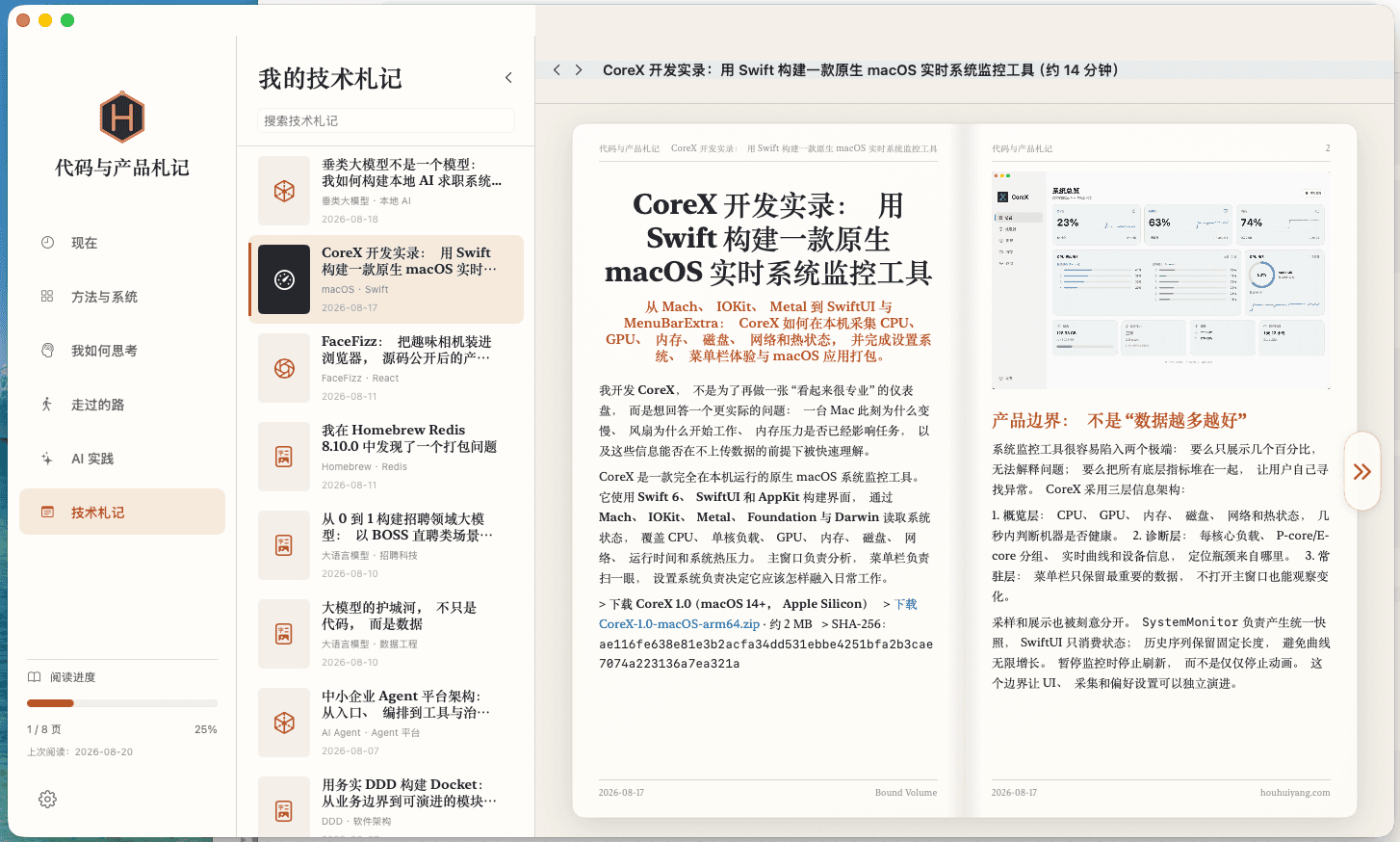
The desktop client uses the /api/reader namespace for profile sections, article lists, full Markdown, tables of contents, and public image resources. It is intentionally separate from the Mini Program API: one client needs compact summaries, while the other needs complete content and durable reading state.
The current release supports:
- Chinese and English articles and profile sections;
- title and tag search;
- bookmarks and local reading progress;
- recent-content caching and offline fallback;
- Markdown, tables, blockquotes, code blocks, and public images;
- a two-page layout inspired by printed books.
Download the macOS app
Download Code & Product Notes 1.0.0 DMG
It requires macOS 14 Sonoma or newer. The current package is ad-hoc signed. If macOS blocks the first launch, right-click the app in Finder and choose Open, or confirm it under System Settings → Privacy & Security.
Verify the download with:
shasum -a 256 houhuiyang-notes-macos-1.0.0.dmg
Expected digest:
7a45940a1278f366f452467b766372e5a693f1d144b0be525c902461d38511e9
How one article reaches three clients
Markdown articles and profile data
              │
              ▼
      Next.js content layer
       │          │
       │          ├── Public website: complete pages, SEO, sharing
       │
       ├── /api/articles: Mini Program summaries and selected sections
       │
       └── /api/reader: macOS Markdown, table of contents, and assets
Every client API is read-only. Articles are created, changed, and removed only in the content repository. Bookmarks, progress, and caches belong to the local experience and never become article facts.
Stable identifiers also reduce coupling. Clients can use slug + locale + updated as a cache version key, ignore unknown future fields, and fall back to the most recent successful cache when the service is unavailable. The website, Mini Program, and macOS app can evolve at different speeds without duplicating ownership.
What I learned
First, multiple clients do not require multiple content sources. A single owner and deliberate contracts let one new article reach every reading surface.
Second, responsive websites and native clients solve different problems. The web offers the lowest barrier and greatest openness. The Mini Program shortens discovery inside WeChat. The macOS app uses screen space, local storage, and native interaction to preserve deeper reading state.
Third, the APIs exist to stabilize product boundaries. The Mini Program should not depend on website DOM, and the desktop reader should not copy the article database. Contracts let clients share facts while keeping their own product decisions.
I want Code & Product Notes to become more than a portfolio page. It is a small system for sustained writing, publishing, reading, and iteration. The website, Mini Program, and macOS app are its current entrances; the durable asset is the unified, portable body of work behind them.