
I built Shixiseng OCR Service not because multimodal models cannot read images, but because reading one image successfully and processing thousands of business documents predictably, economically, and traceably are very different problems.
Recruiting workflows receive résumé screenshots, certificate photos, chat records, scanned PDFs, and skewed tables. The shortest demo is to send the original image to a multimodal model and ask for names, schools, employers, dates, and projects. It often looks impressive. In production, however, the same image may produce different structures across calls; orientation, clarity, and document length affect results; long PDFs are expensive; and when a value is wrong, it is difficult to tell whether the failure happened during visual reading, context construction, or reasoning.
My solution is an independent OCR layer before the LLM. OCR does not replace the model. It separates reading the characters from understanding what they mean: OCR produces text, pages, coordinates, and confidence scores; the LLM performs normalization, extraction, and business reasoning.
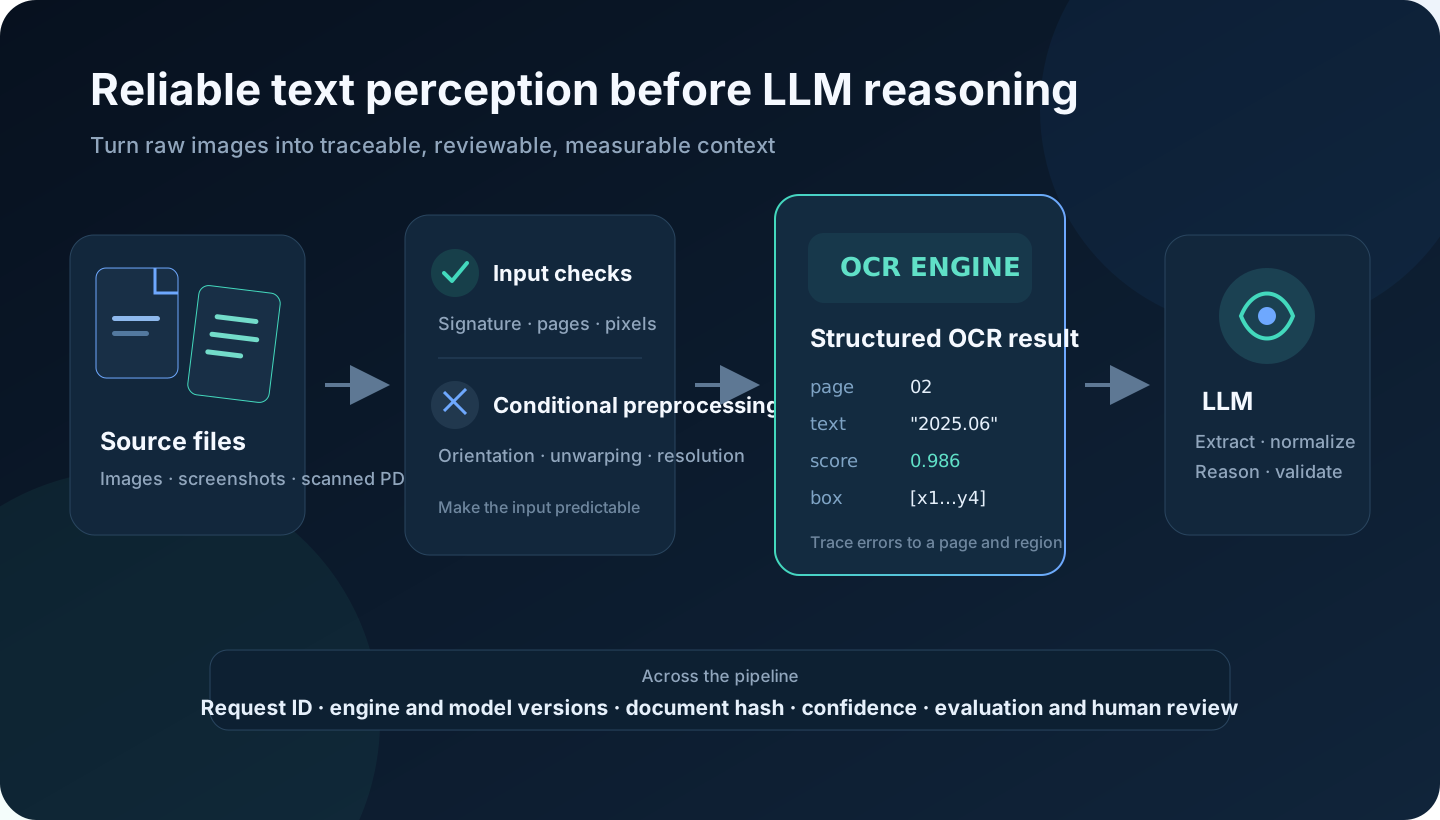
Separate perception from understanding
Sending the original image directly to a model makes one request responsible for decoding, text recognition, layout understanding, field extraction, and reasoning. When it fails, the only evidence is usually an incorrect-looking JSON object.
I split the pipeline into explicit stages:
Image / scanned PDF
  → file authenticity and resource-limit checks
  → page rasterization and conditional preprocessing
  → text detection and recognition
  → text, pages, boxes, and confidence
  → LLM extraction, normalization, and reasoning
  → business validation and human review
The intermediate representation matters. If a model turns 2023.08 into 2028.03, I can inspect the page, OCR line, box, and confidence score. If OCR was correct, the prompt or field rules need work. If OCR was already wrong, the image pipeline, engine, or fallback policy is responsible. The system can finally answer where the error occurred.
OCR also reduces irrelevant multimodal input. Blank pages, repeated pages, decoration, and low-value areas can be filtered. Text can be grouped by page or block instead of sending dozens of high-resolution images. At scale, that changes latency, token cost, and concurrency capacity.
The current production baseline
Shixiseng OCR Service accepts JPG, PNG, WEBP, BMP, TIFF, and PDF. It provides synchronous and asynchronous APIs that share the same recognition use case.
The synchronous endpoint handles a small image or short document in the request. The asynchronous endpoint persists task metadata and a temporary file, delegates recognition to a Celery worker, and returns a job_id. There are not two OCR implementations—only two scheduling modes.
The response is more than a plain string:
{
  "engine": "rapidocr-onnxruntime",
  "page_count": 2,
  "text": "full text...",
  "pages": [
    {
      "page_number": 1,
      "width": 1440,
      "height": 2036,
      "lines": [
        {
          "text": "2023.08 - 2025.06",
          "confidence": 0.986421,
          "box": [[112, 284], [486, 284], [486, 326], [112, 326]]
        }
      ]
    }
  ],
  "duration_ms": 1260
}
Full text is convenient for LLM context, page text preserves document boundaries, boxes support evidence lookup and reading-order reconstruction, and confidence can trigger a retry or review. This structure has more lasting value than a single OCR string.
What the service is actually built on
This is not a thin PaddleOCR wrapper. Python 3.11 is the production baseline, and the HTTP layer, document processing, OCR engines, and task execution are separated. The current release pins these core versions:
| Layer | Pinned component | Responsibility |
|---|---|---|
| CPU OCR | RapidOCR 3.4.2 + ONNX Runtime 1.22.1 | Default production baseline for detection and recognition |
| GPU OCR | PaddleOCR 3.2.0 + a CUDA-compatible PaddlePaddle GPU wheel | High-throughput recognition on GPU nodes |
| Documents | PyMuPDF 1.26.4 | Decoding, dimension checks, PDF paging, and RGB rasterization |
| HTTP API | FastAPI 0.141.1 + Uvicorn 0.52.0 | Uploads, authentication, schemas, synchronous API, and job queries |
| Processes | Gunicorn 23.0.0 + uvicorn-worker 0.4.0 | Workers, timeouts, graceful shutdown, and request recycling |
| Async work | Celery 5.6.3 + Redis client 6.4.0 | Queues, state, retries, time limits, idempotency, and rate limiting |
| Configuration | Pydantic Settings 2.10.1 + Structlog 25.4.0 | Typed startup validation and structured JSON logs |
“Pinned” does not mean permanently best. It means this exact combination is represented in the lock file, automated tests, and release process. Production stability comes from a validated combination, not from installing whatever happens to be latest during deployment.
Why RapidOCR is the CPU default
RapidOCR provides a practical OCR layer over multiple runtimes; this service explicitly uses ONNX Runtime for CPU inference. It has a smaller deployment surface than a full PaddlePaddle installation, requires no CUDA, and is suitable for ordinary Rocky Linux or AlmaLinux x86_64 servers.
The adapter converts RapidOCR version-specific output into the service-owned PageResult model. API consumers never receive third-party SDK objects, so the engine or model can change without changing the external JSON contract.
Where PaddleOCR fits
PaddleOCR is the optional GPU implementation, not a hidden dependency of the CPU build. The project pins paddleocr==3.2.0, but deliberately does not put one universal PaddlePaddle GPU wheel in the generic runtime lock. The correct wheel depends on the NVIDIA driver, CUDA version, operating system, and Python ABI.
On a GPU build node, I first verify the environment with nvidia-smi, install the PaddlePaddle GPU package from the official compatibility matrix, install PaddleOCR, and then run acceptance tests with real documents. Startup calls paddle.is_compiled_with_cuda(). Strict gpu mode fails readiness when CUDA is unavailable; auto mode may emit a warning and fall back to RapidOCR CPU.
What “stable” means here
I do not treat a project's latest tag as a production definition. A stable OCR baseline needs all of the following:
- A known Python, Linux, glibc, CPU instruction-set, or CUDA combination.
- Exact package versions and hashes for reproducible builds.
- Pre-downloaded, versioned model weights; startup must not depend on the public internet.
- Regression results on real Chinese résumés, screenshots, certificates, and scanned PDFs.
- Verified synchronous, asynchronous, timeout, retry, restart, and CPU-fallback behavior.
PaddleOCR 3.2.0 is only a package number. PaddleOCR 3.2.0 + named model weights + compatible PaddlePaddle/CUDA + target-host acceptance results is a deployable baseline.
Input handling comes before model tuning
The service does not trust filename extensions or a client-provided Content-Type. It detects the format from the file signature and enforces upload size, total image pixels, PDF page count, per-page render size, and decodability. Encrypted PDFs, damaged files, and oversized images are rejected before entering an OCR engine.
This is both an accuracy and a reliability boundary. A decompression-heavy image can exhaust memory, an unbounded PDF can monopolize a worker, and a disguised file should not be passed blindly to a parser.
PDF pages are rendered by PyMuPDF to RGB PNG at a default 180 DPI, without an unnecessary alpha channel. Each page image is released immediately after recognition. DPI is not “the higher, the better”: doubling width and height roughly quadruples the pixel workload. The correct baseline comes from measuring accuracy and throughput on the actual corpus.
Preprocess according to the failure mode
A generic recipe—grayscale, binarize, sharpen, upscale—often damages faint text, stamps, or table rules while adding latency. I prefer conditional processing:
| Observed problem | Treatment | Risk to watch |
|---|---|---|
| 90°/180° rotation | orientation classification and rotation | do not rely only on EXIF |
| Perspective distortion | corner detection and unwarping | clipping page edges |
| Uneven light or gray background | local contrast or adaptive thresholding | losing faint text or stamps |
| Small text | bounded upscaling or higher PDF DPI | sharp memory and latency growth |
| Slight skew | baseline-angle estimation and correction | table lines biasing the angle |
| Compression noise | light denoising | deleting character strokes |
| Multiple columns | layout segmentation before OCR | incorrect reading order |
The current service implements format detection, resource limits, PDF rasterization, and normalized RGB input. Orientation correction, unwarping, and layout recovery are not yet a standalone production stage. I plan to add them through a versioned DocumentPreprocessor, so every transformation can be disabled, tested, and compared.
CPU is the baseline; GPU is a capacity decision
GPU does not automatically mean better accuracy. Hardware primarily changes throughput and the practical model size. Accuracy still depends on the model, language, input quality, and domain data. A CPU fallback remains essential because the NVIDIA driver, CUDA runtime, PaddlePaddle wheel, and model must all be compatible.
Models are warmed during startup. Readiness passes only when the OCR engine, state Redis, and Celery broker are available. Model files live in a shared directory and are downloaded before release, so the first real user never becomes an accidental initialization test.
Synchronous and asynchronous paths are different capacity models
Small images are simplest synchronously, while a long PDF should not occupy a web worker. Synchronous recognition has a total timeout and tells the caller to use the job API when exceeded. Asynchronous work has soft and hard time limits and bounded exponential retries only for retryable failures.
Async submission supports Idempotency-Key, preventing duplicate jobs when a caller retries after a network timeout. Redis stores atomic task-state transitions; terminal tasks delete temporary files and expire results by TTL.
The OCR representation can also be cached by document hash, engine version, model version, and preprocessing version. Changing a prompt or LLM should not require reading the image again.
Publicly reachable does not mean unprotected
Business endpoints use Bearer tokens, and production refuses to start without sufficiently strong credentials. Current and previous tokens can coexist during rotation. Nginx handles TLS, request limits, and edge rate limiting; the application applies a second per-client sliding window.
The service runs under a non-login ocr-service account with hardened systemd settings. Logs contain request ID, client, format, size, pages, engine, duration, and error code—but not OCR text, tokens, or complete local paths. A request ID connects Nginx, API, worker, and job state without copying personal information into logs.
Deployment model
The production baseline is Rocky Linux 9 or AlmaLinux 9, Python 3.11, Redis 6+, Nginx, systemd, and Jenkins. Gunicorn with Uvicorn workers serves the API; separate Celery workers handle long tasks. CPU and GPU dependencies are built separately, and virtual environments are never copied from a developer machine.
Releases are immutable:
/opt/ocr-service/
├── releases/20260824-<git_sha>/
├── shared/.env
├── shared/models/
├── shared/tmp/
└── current -> releases/20260824-<git_sha>/
Jenkins runs Ruff, Mypy, pytest, coverage, dependency audit, and wheel build on a compatible Linux node. It produces a SHA-256-verified archive. The host creates a new venv, installs hash-locked dependencies, atomically moves the current symlink, and restarts the worker and API. A failed smoke test switches the symlink back.
After deployment I verify process liveness, readiness, one synchronous recognition, and one asynchronous job from queued to succeeded. active (running) alone does not prove that the model, Redis, and broker work.
A concrete OCR best-practice checklist
1. Build an evaluation set before tuning
Sample real traffic by failure type: native PDFs, scanned PDFs, phone photos, skew, shadows, low resolution, two-column résumés, tables, stamps, and mixed Chinese-English text. Keep tuning and regression sets separate.
CER is useful for OCR mechanics, but business metrics matter more: exact match for names and phone numbers, normalized-date accuracy, and recall of education and employment history. I track preprocessing deltas, page P50/P95, peak memory, low-confidence rate, human-review rate, final LLM field accuracy, and cost per document.
2. Extract native PDF text before applying OCR
If a PDF already has a trustworthy text layer, PyMuPDF extraction is normally more accurate and cheaper than rasterizing it. OCR should handle pages with no text layer, a broken hidden layer, or image-dominant content. The decision should consider text length, printable-character ratio, coordinate validity, and sampling—not merely whether a few characters were returned.
3. Make preprocessing optional, versioned, and replayable
Record the reason, input and output dimensions, and configuration version for every transform. Never overwrite the only original. PaddleOCR 3.x includes orientation classification and document unwarping, but enabling them must be justified by corpus-level measurements. Phone photos may benefit; clean scans may only become slower.
4. Do not confuse OCR output order with reading order
Sorting by Y then X can work for one column. Two-column résumés, tables, and sidebars need layout segmentation. LLM input should retain explicit page and block boundaries; otherwise every character can be correct while the reconstructed document is wrong.
5. Use confidence for routing, not as an absolute probability
Confidence values are not directly comparable across engines and models. Calibrate thresholds on domain data. High-confidence lines proceed; medium-confidence regions can be enlarged or sent to another engine; critical low-confidence fields can include an image crop for a multimodal model; unresolved conflicts go to human review.
6. Size concurrency from peak memory
OCR resource usage depends on pixels, models, inference threads, and simultaneous pages. Web workers, ONNX threads, and Celery concurrency must be budgeted together. The current Celery concurrency=1 is a conservative starting point, then load testing determines safe growth. GPU workers also need limits because each process may load another copy of the model into VRAM.
7. Diff every engine or model upgrade
Run old and new versions over the same regression documents. Compare text, field metrics, latency, and memory, then inspect regressions in numbers, dates, names, and mixed-language content. Canary the new version, write version metadata into results, and keep the old release and model available for rollback.
What I preserve when calling the LLM
The model input should not be only the OCR text field. I retain page and block boundaries, source page and confidence for critical fields, image crops for uncertain regions, and table cells or Markdown instead of flattened text.
The model can then return a field together with evidence and uncertainty:
{
  "field": "graduation_date",
  "value": "2025-06",
  "evidence": {
    "page": 2,
    "text": "2023.08 - 2025.06",
    "ocr_confidence": 0.986421
  },
  "needs_review": false
}
This does not make an LLM infallible. It makes failures visible, replayable, and measurable—which matters more in recruiting, contracts, finance, and records than a single impressive response.
Final judgment
Not every image needs OCR first. Direct multimodal input is often better for scene understanding, chart questions, visual relationships, or a few ad-hoc images. But when the task is text-centered and requires batch processing, evidence lookup, privacy controls, reproducibility, and predictable cost, an independent OCR layer remains valuable infrastructure.
Shixiseng OCR Service currently establishes the reliable baseline: safe image and PDF ingestion, page-level recognition, structured output, CPU/GPU engines, sync/async execution, authentication, rate limiting, idempotency, observability, and rollback. The next improvement is not blindly choosing a larger model. It is building a real failure corpus and adding conditional preprocessing, layout recovery, confidence routing, and field-level evaluation.
The goal is not a beautiful OCR benchmark score. It is to turn an image into cleaner, explainable, and trustworthy context before it reaches the LLM.